
Text from Salesforce
Send SMS, and MMS where supported, from Contacts, Leads, Accounts, Cases and the custom objects you add, and see the whole history on the record.
- Templates
- Schedule for later
- Delivery status
Salesforce-native Your own Twilio account
Text customers from Salesforce records, work every conversation as a team in a shared inbox, and run outreach and automation, all through your own Twilio account.
Animation: a user writes "Hi Sarah, your appointment is confirmed for tomorrow at 10:30 AM." in the ConnectSMS Text Messages component on a Salesforce Contact record. ConnectSMS sends it through the company's own Twilio account to the customer's phone, the status changes to Delivered, and the customer's reply "Perfect, thank you." appears on the same record.
 ConnectSMS+
Your Twilio account
ConnectSMS+
Your Twilio account
ConnectSMS is a Salesforce SMS and MMS app that connects Salesforce to your own Twilio account. It lets your team send and receive text messages from Salesforce records, manage conversations together in a shared inbox, run controlled outreach, and automate messaging through Flow, Apex, the REST API and Agentforce.
The platform
Six capabilities that work together, so a text started on a record, in the inbox, in an outreach or in a Flow all follow the same rules.
Send SMS, and MMS where supported, from Contacts, Leads, Accounts, Cases and the custom objects you add, and see the whole history on the record.
Work inbound and outbound conversations together across every business number you can view.
Reusable messages with Salesforce merge fields, fallbacks for empty values and a preview against a real record.
Send to a report, a Salesforce Campaign or filtered records, and review exactly who will receive it first.
Ten Flow actions, a global Apex API and the Salesforce REST API, ready for your processes and your agents.
Control numbers, access, policies, consent and operations from one Setup workspace.
Also in every license: Standard and custom objects Schedule for later Campaign SMS
Shared inbox
One inbox for every business number you can view, with the customer's Salesforce record one click away.
Animation: in the ConnectSMS Inbox, a new text from Sarah Chen, "Perfect, thank you. Should I bring anything?", moves the conversation to the top of the list with an unread badge. Alex Kim opens it, selects Assign and then Assign to me, and replies "Just your ID. See you tomorrow." from the Support line, the number the customer texted. The reply's status changes from Queued to Sent to Delivered.
Recreated from the ConnectSMS interface with sample data.
Replies go out from the business number the customer texted, so they keep seeing the same number.
A new conversation links itself when exactly one Contact, or failing that one open Lead, has the number.
Assign conversations to yourself, close and reopen them, and see who has replied, all shared across the team.
Automation
ConnectSMS gives Salesforce Flow, Apex, REST integrations and Agentforce the same messaging your team uses on screen.
A message sent by automation still respects sender access, recipient validation, opt-outs and your messaging policies. Nothing gets a shortcut.
ConnectSMS actions in Flow Builder
Outreach
Campaign managers build SMS outreach from a Salesforce report, the members of a Salesforce Campaign, or records that match filters.
Step 5 of 5
Review & Send
1,184 people will be sent the message.
Recreated from the ConnectSMS interface with sample data.
Bring your own Twilio
ConnectSMS works with your own Twilio account. Twilio bills you directly for messaging, and ConnectSMS doesn't impose message-plan limits.
In Salesforce
Your Twilio account
No ConnectSMS servers in between: Salesforce connects directly to Twilio.
Business workflows
Common patterns teams build with ConnectSMS and Salesforce automation.
Reliability & governance
Every message is recorded in Salesforce before ConnectSMS calls Twilio. If Twilio's answer is lost, the message is marked Unknown and checked with Twilio, never blindly sent again.
Opt-outs are always enforced, and checked again when a scheduled message is sent.
People only see and send from the business numbers they've been given.
Turn off sending for the whole org at once. The reason is recorded in the audit log.
Normal path
If Twilio's answer is lost
Product tour
Scroll, drag or use the arrow keys to turn through ConnectSMS. Select the card at the front to see it full size.
The Flow Builder screen is a real screenshot; the others are recreated from the ConnectSMS interface with sample data.
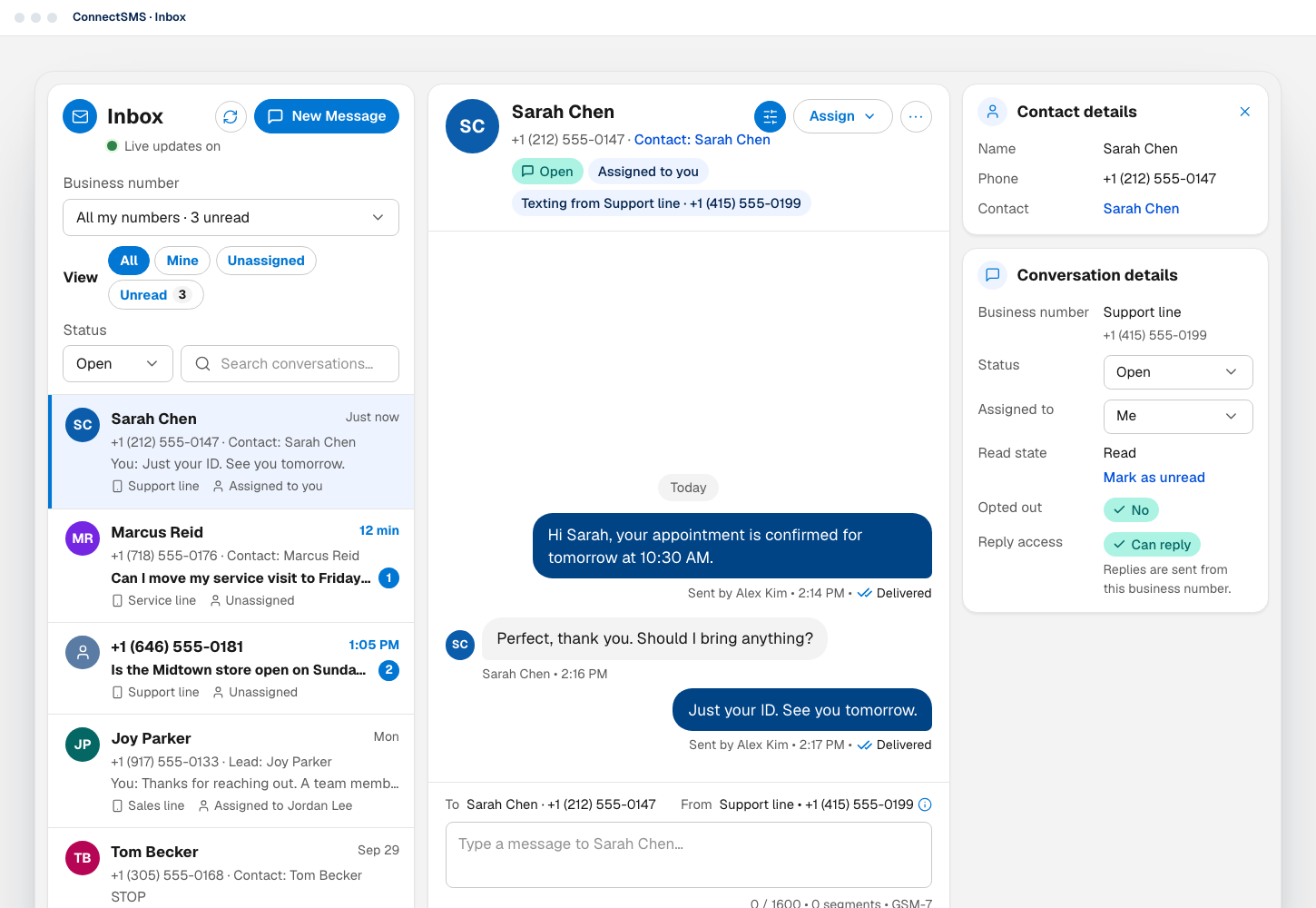
Every conversation on the business numbers you can view, filtered by number and by All, Mine, Unassigned or Unread, with the customer's details alongside.
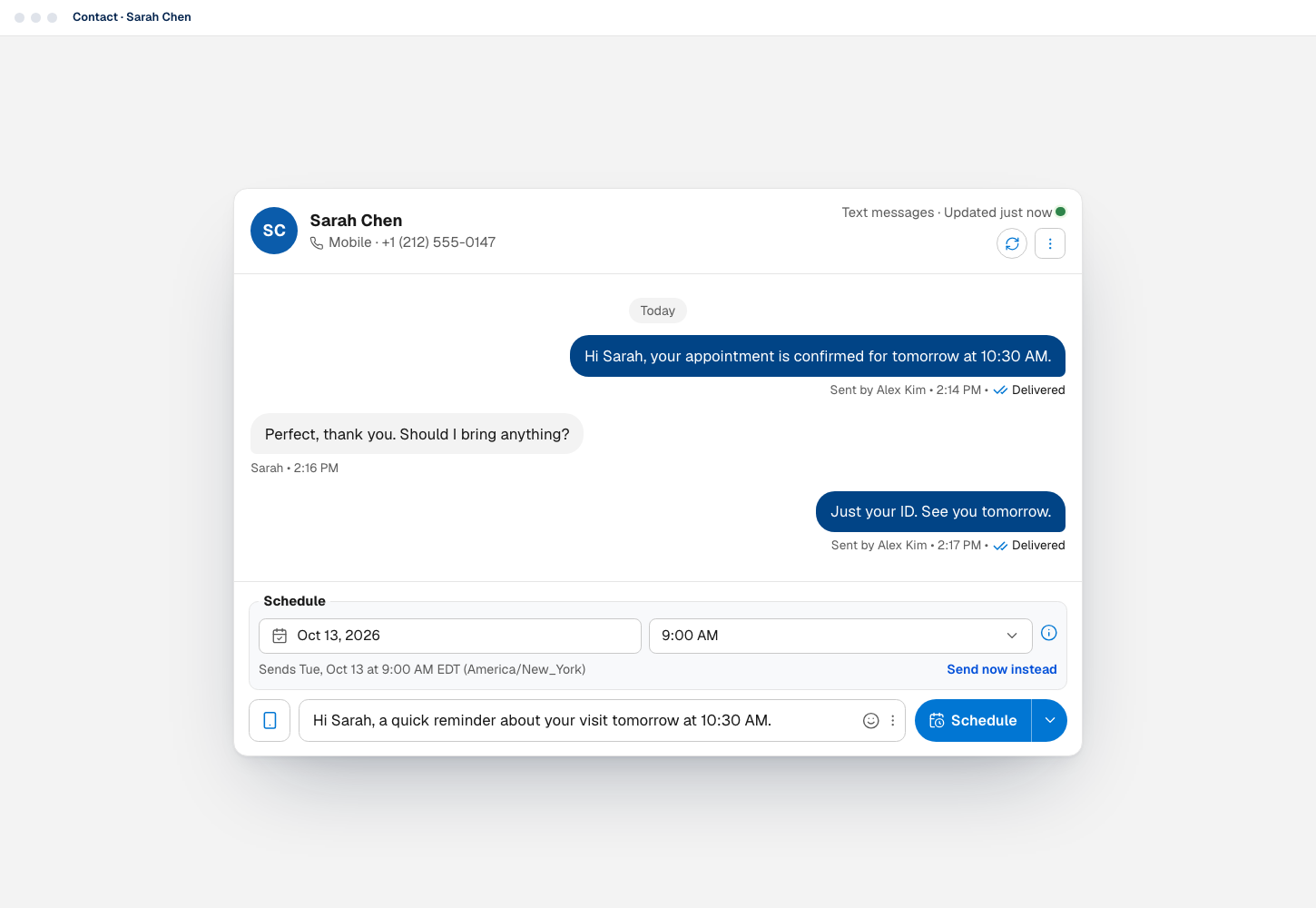
The Text Messages component shows the whole history on the record, and sends or schedules from the number you choose.
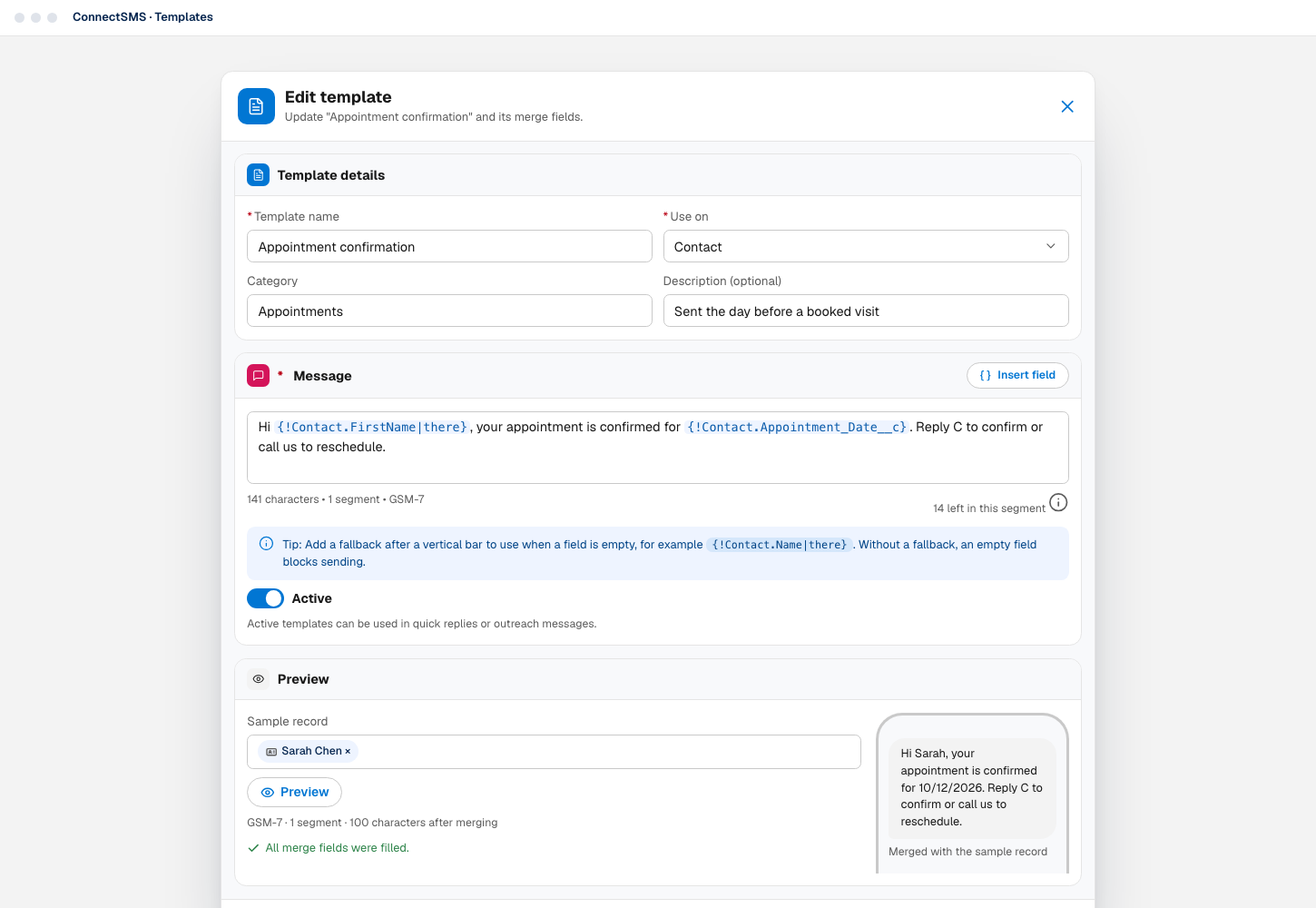
Reusable messages with merge fields, fallbacks for empty fields, a live segment count and a preview against a real record.
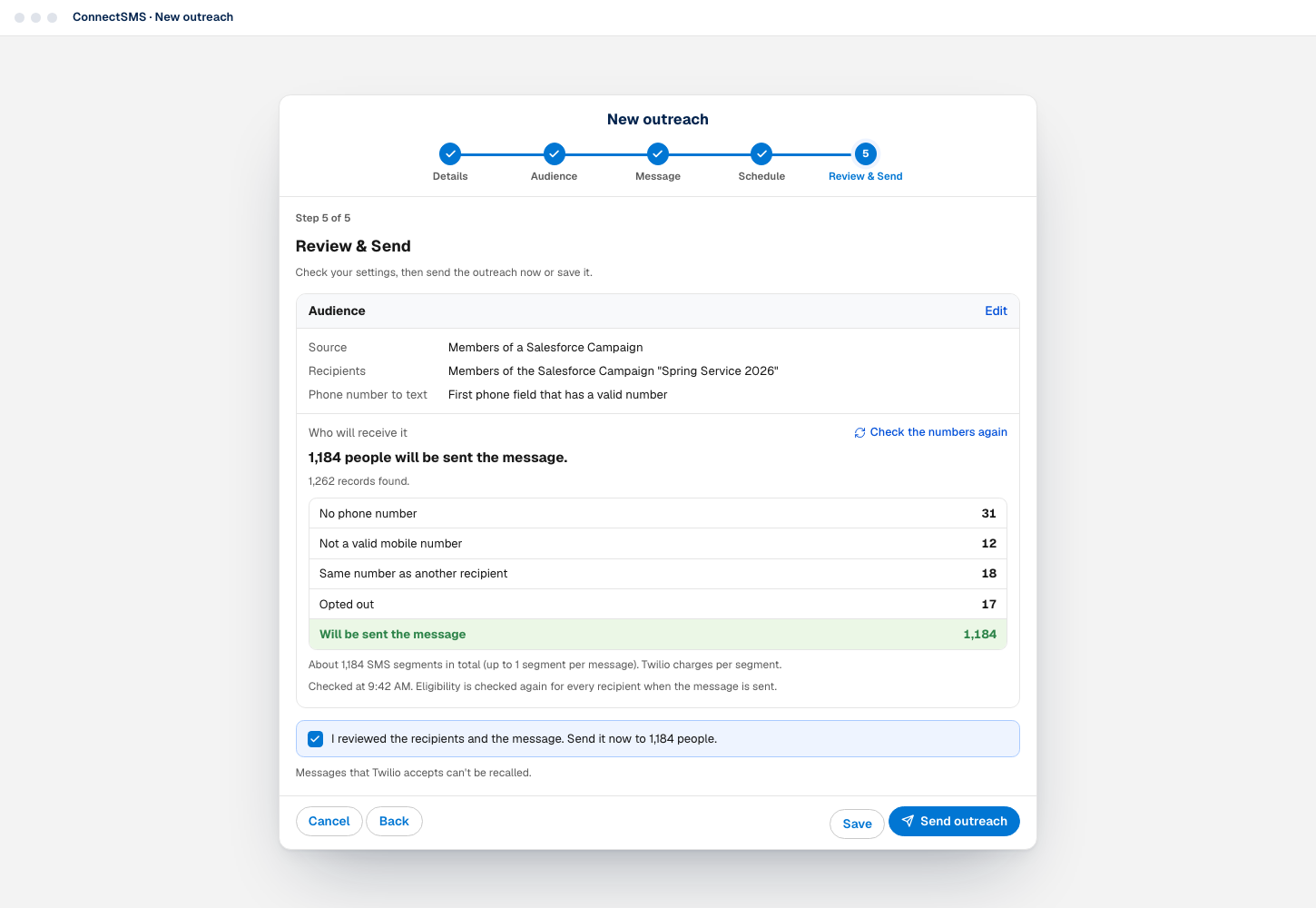
Outreach shows exactly who will receive a message, and who won't and why, before anything is sent.
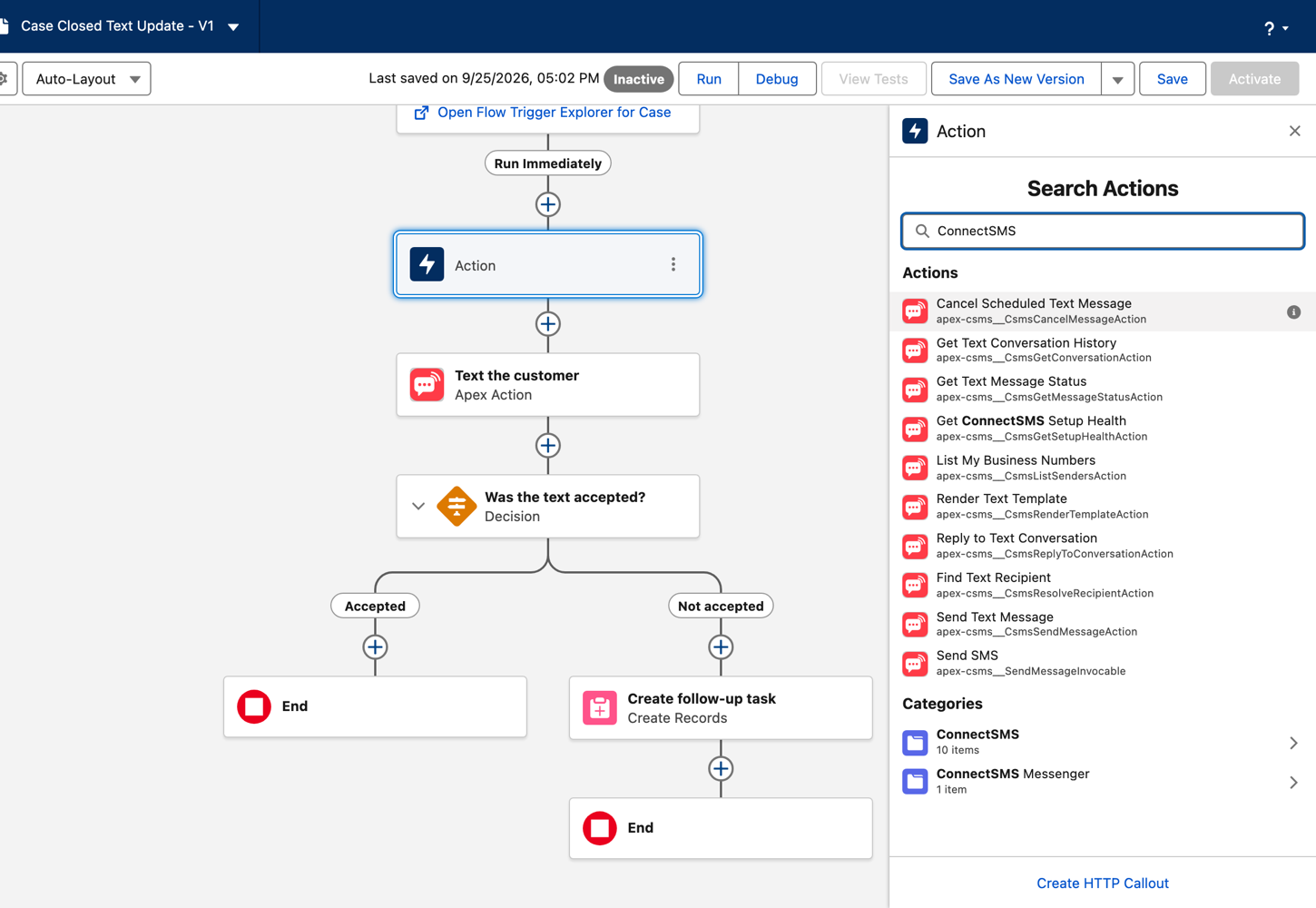
The ten ConnectSMS actions in Flow Builder, next to a Flow that texts the customer when a Case is closed and checks whether the text was accepted. A real screenshot.
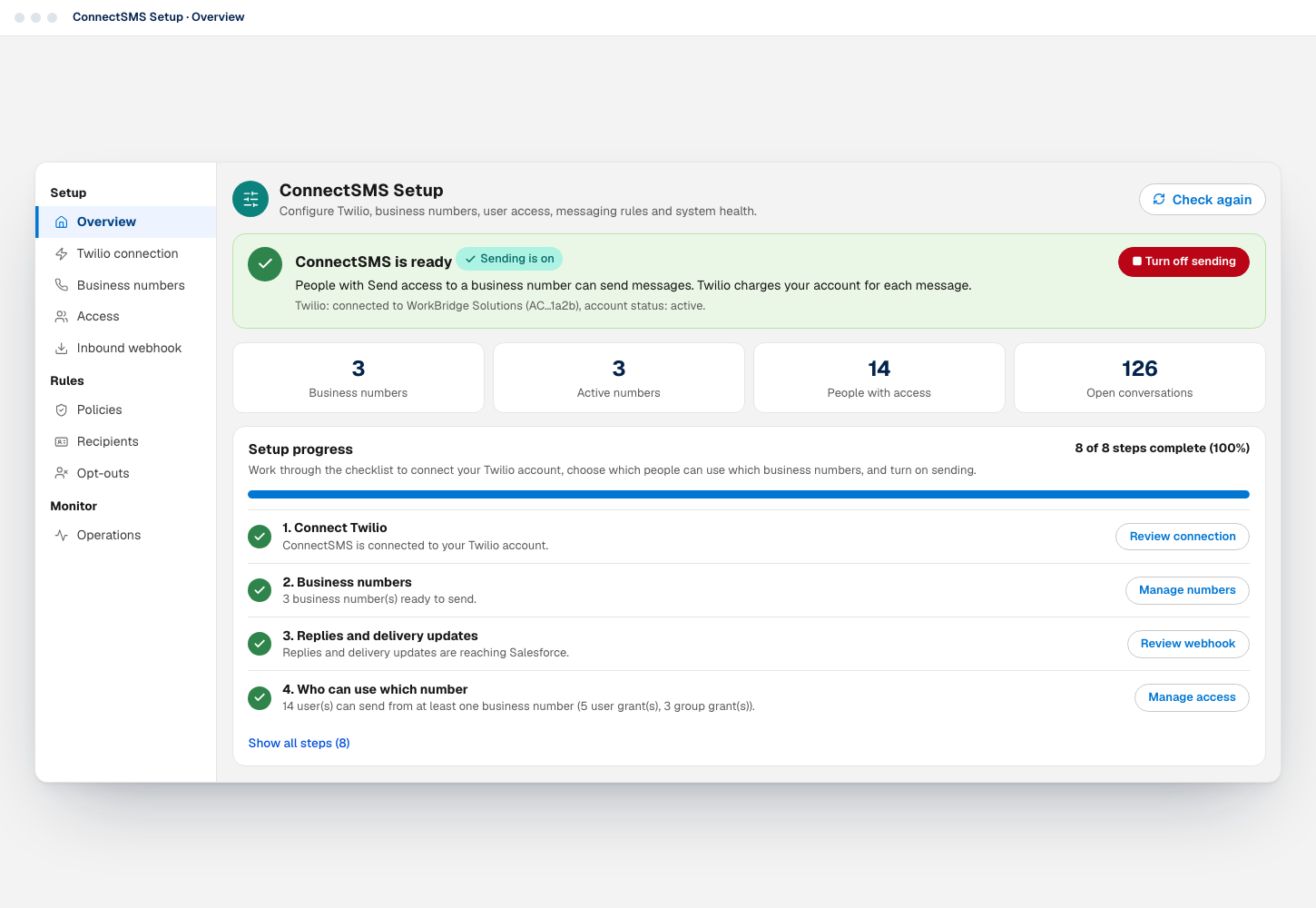
An eight-step checklist connects Twilio, business numbers, webhooks and access, and sending stays off until it's ready.
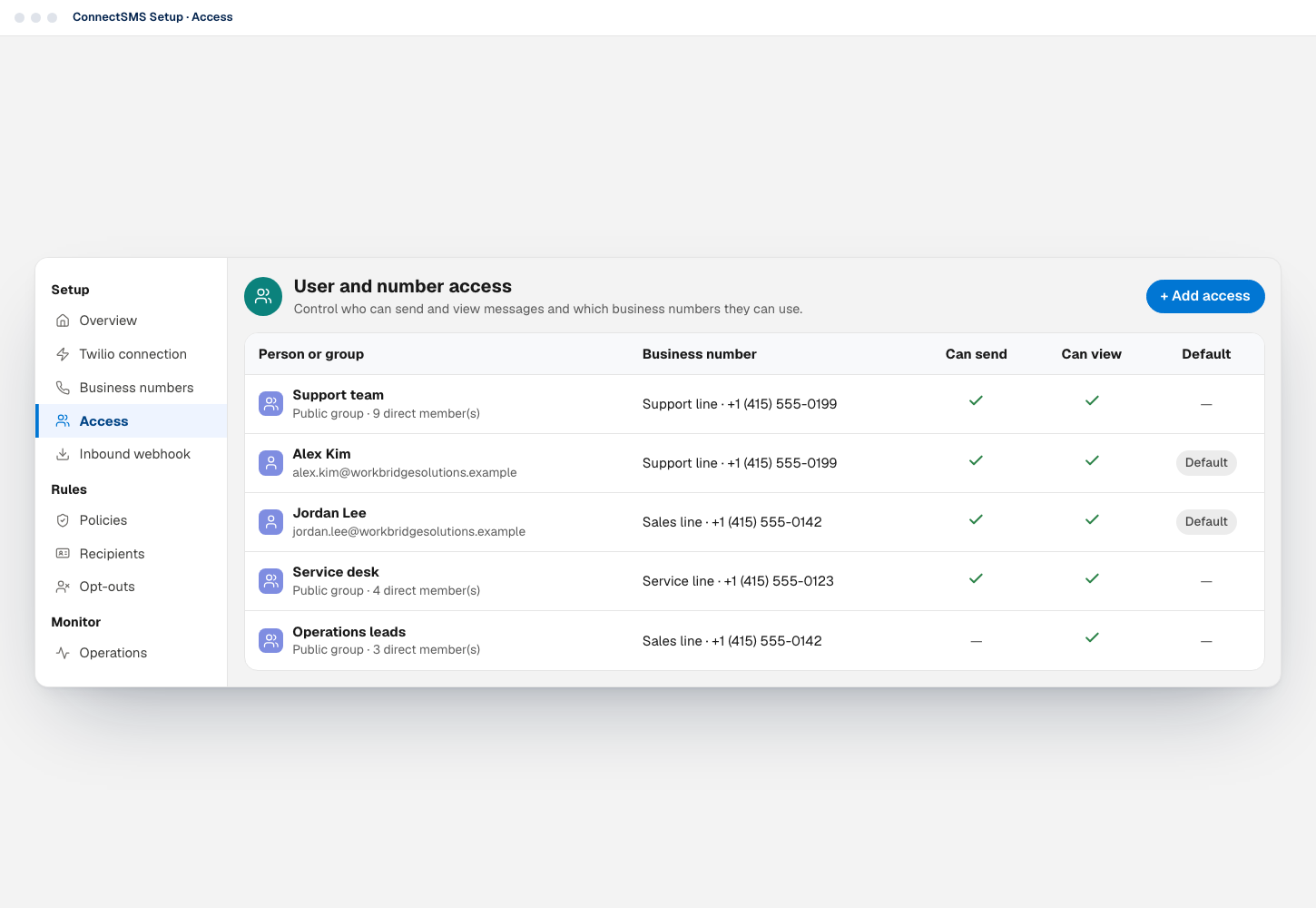
Admins decide which people and public groups can send from, or only view, each business number.
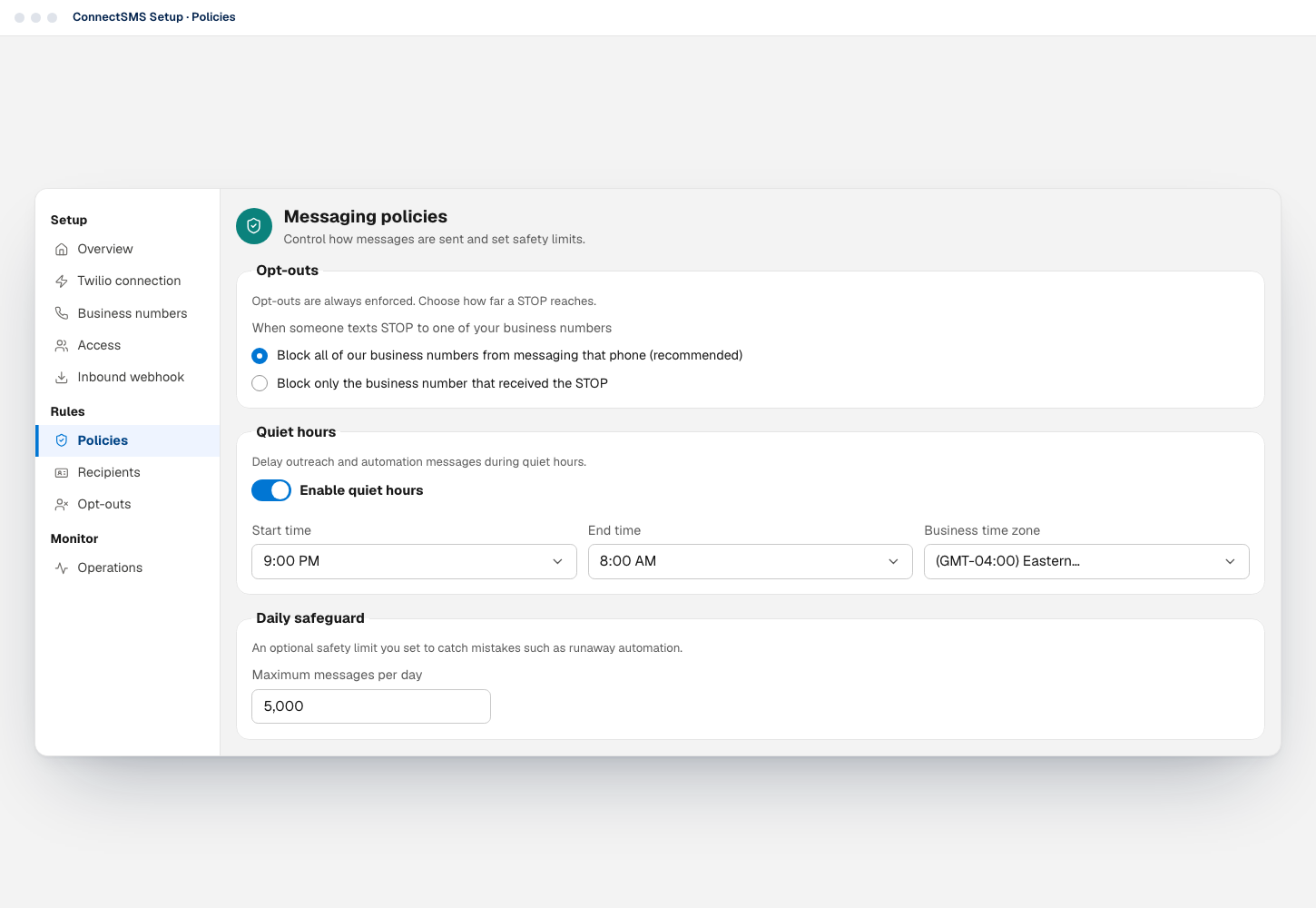
Opt-out scope, quiet hours for outreach and automation, and an optional daily safeguard, set once for the whole org.
FAQ
Straight answers about how ConnectSMS works with Salesforce and Twilio.
ConnectSMS is a Salesforce SMS and MMS app that connects Salesforce to your own Twilio account. Your team can text customers from Salesforce records, work conversations together in a shared inbox, run outreach to reports, campaigns and filtered records, and automate messaging with Flow, Apex and the Salesforce REST API.
Yes. Installing ConnectSMS from AgentExchange starts a 14-day free trial of the full edition, with every feature, and no credit card is required. After the trial, ConnectSMS is $120 per user per year. Twilio still bills your own Twilio account for anything you send during the trial, and Twilio's own trial accounts don't work with ConnectSMS, so connect an upgraded Twilio account.
Yes. ConnectSMS is listed on Salesforce AgentExchange (formerly AppExchange), Salesforce's app marketplace. It installs from the listing as a managed package into your production org or a sandbox, and installing doesn't send anything: sending stays off until an admin finishes setup and turns it on.
Yes. ConnectSMS uses your own Twilio account and numbers, Twilio bills that account directly, and ConnectSMS adds no message-plan limits. Each number needs to be in a Twilio Messaging Service, and US numbers need an approved A2P 10DLC campaign or verified toll-free status.
Yes. ConnectSMS has no country restrictions for text messages: you can send from Twilio numbers in any country and text any country your Twilio account is allowed to reach. Allow those countries in Twilio's Messaging Geographic Permissions, and check Twilio's pricing and sender rules for each one. Picture messages (MMS) are the one exception: attachments go only to US, Canadian and Australian numbers, the countries where Twilio documents MMS delivery.
Yes. Twilio passes incoming texts to a webhook on a public Salesforce Site, and ConnectSMS shows them in the conversation on the record and in the shared inbox. When exactly one Contact, or failing that one open Lead, has the sender's number, the conversation is linked to that record automatically.
Yes. ConnectSMS adds ten invocable actions to Flow Builder under ConnectSMS, including Send Text Message (with an optional Send At time to schedule it), Preview Text Message, Get Text Message Status and Reply to Text Conversation. Flow sends go through the same access, opt-out and policy checks as sending from the screen.
Yes, with ConnectSMS outreach. A campaign manager chooses an audience from a Salesforce report, the members of a Salesforce Campaign, or records that match filters, writes the message, and sees exactly who will receive it before sending or scheduling. People who opted out, duplicate numbers and missing or invalid numbers are left out automatically.
When a customer replies with one of Twilio's standard opt-out keywords, such as STOP, UNSUBSCRIBE or CANCEL, ConnectSMS records the opt-out and stops texting that number; START, YES or UNSTOP opts them back in. Opt-outs are always enforced, checked when a message is requested and again when it is sent, and shown to users in the composer and inbox.
ConnectSMS doesn't impose message-plan limits or quotas; Twilio bills your account for what you send. Admins can set an optional daily safeguard, and Twilio and the carriers apply their own sending rules.
Try it now: every feature, free for 14 days
Install ConnectSMS from AgentExchange, connect your Twilio account and give your team the numbers they should text from.
ConnectSMS is published by WorkBridge Solutions. Twilio bills your Twilio account directly for messaging, including during the trial.